Extract wildlife observation data with SensingClues
SensingClues allows you to record, monitor and analyze wildlife observations to support nature conservation initiatives. This notebook shows the following:
Basic: the main SensingClues-functionality of extracting observation and track data.
Advanced: this section includes the usage of a hierarchy of available concepts (e.g. animal species or type of activity), which enhances reporting and analysis of the observation data. Further, we show how to collect and visualize layer data from SensingClues.
You can adapt this notebook to extract your own recordings. For more detail on what you can configure as a user, see the API-documentation of the sensingclues-package.
Before you start
To run this notebook, you should: - create a personal account at SensingClues using the Cluey Data Collector app, which can be downloaded from the Google Playstore (not supported for iOS currently). Also see here. - install the sensingclues-package in a virtual python environment (pip install -e . from the main directory of the repository). - install the requirements in requirements.txt (if not already installed automatically in the previous step). -
create a file ‘.env’ in the root of the wildcat-api-python-repository, containing your SensingClues credentials. These will be read in this notebook to log in. The file should look like this:
# SensingClues credentials
USERNAME=your_username
PASSWORD=your_password
Configuration
[1]:
import os
[2]:
from dotenv import load_dotenv
[3]:
from sensingclues import sclogging
from sensingclues.api_calls import SensingClues
from sensingclues.src import helper_functions as helpers
[4]:
logger = sclogging.get_sc_logger()
sclogging.set_sc_log_level("DEBUG")
[5]:
load_dotenv()
[5]:
True
[6]:
%load_ext autoreload
%autoreload 2
[7]:
# N.B. you can place your credentials here as well, but this is not recommended.
username = os.getenv("USERNAME")
password = os.getenv("PASSWORD")
Connect to SensingClues
[8]:
sensing_clues = SensingClues(username, password)
2024-05-29 10:24:17 [api_calls.py:54] INFO - Successfully logged in to SensingClues.
[9]:
# you should have logged in automatically by calling the class.
# if not, you can call the login-method separately.
# status = sensing_clues.login(username, password)
[10]:
# It is not necessary to log out, but you can do so by calling:
# sensing_clues.logout()
Check available data
By default, you have access to several groups of data, such as a demo dataset and a large dataset offered by Global Forest Watch.
[11]:
info = sensing_clues.get_groups()
info
[11]:
| name | description | n_records | |
|---|---|---|---|
| 0 | focus-project-2435800 | 3june2020 | 405 |
| 1 | focus-project-7136973 | Cluey Data Collector | 688 |
| 2 | focus-project-7811010 | Creekish mountains | 157 |
| 3 | focus-project-1234 | Demo Upload | 1848 |
| 4 | focus-project-GFW | GFW | 49468 |
[12]:
# specify the group(s) to extract data from
groups = [
    "focus-project-1234",
]
Basic functionality
Get observation data
Get track data
Get observations
You can filter the extracted observations in multiple ways, such as data, coordinates (bounding box) and concepts. For full detail on the options, see the documentation of the API. Some key features are shown here:
Date and time: set
date_fromand/ordate_until(in format %Y-%m-%d, assumes UTC).Coordinates: set
coord, e.g. {“north”: 32, “east”: 20, “south”: 31, “west”: 17}.Concepts: set
conceptsto include, e.g. ‘animal’. See example shown later in this notebook.
Each observation has a unique
entityIdand may have multiple concepts (labels) associated with it, in which case the number of records in the observations-dataframe is larger than the number of observations mentioned by the logger.Reading all data in a group can take minutes or longer, depending on the size of the dataset. If you want to do a quick test, you can limit the number of pages to read by setting
page_nbr_sample.
[13]:
# a quick test can be done like so
obs_sample = sensing_clues.get_observations(groups=groups, page_nbr_sample=2)
2024-05-29 10:24:18 [api_calls.py:458] INFO - Scope '['focus-project-1234']' contains 1848 entities for data type 'observations'.
2024-05-29 10:24:18 [api_calls.py:465] INFO - Restricting number of pages to a sample of 2.
2024-05-29 10:24:18 [api_calls.py:478] INFO - Started reading available records.
2024-05-29 10:24:18 [api_calls.py:481] INFO - Reading page   0 out of 2 pages.
2024-05-29 10:24:19 [api_calls.py:493] INFO - Finished reading available records.
[14]:
# see the API-documentation for a full description of filter possibilities
# to filter on concepts, see example shown later in this notebook.
observations = sensing_clues.get_observations(
    groups=groups,
    date_until="2018-07-01",
    coord={"north": 32, "east": 20, "south": 31.5, "west": 10}
)
2024-05-29 10:24:20 [api_calls.py:458] INFO - Scope '['focus-project-1234']' contains 159 entities for data type 'observations'.
2024-05-29 10:24:20 [api_calls.py:478] INFO - Started reading available records.
2024-05-29 10:24:20 [api_calls.py:481] INFO - Reading page   0 out of 16 pages.
2024-05-29 10:24:20 [api_calls.py:481] INFO - Reading page   2 out of 16 pages.
2024-05-29 10:24:21 [api_calls.py:481] INFO - Reading page   4 out of 16 pages.
2024-05-29 10:24:22 [api_calls.py:481] INFO - Reading page   6 out of 16 pages.
2024-05-29 10:24:23 [api_calls.py:481] INFO - Reading page   8 out of 16 pages.
2024-05-29 10:24:24 [api_calls.py:481] INFO - Reading page  10 out of 16 pages.
2024-05-29 10:24:24 [api_calls.py:481] INFO - Reading page  12 out of 16 pages.
2024-05-29 10:24:26 [api_calls.py:481] INFO - Reading page  14 out of 16 pages.
2024-05-29 10:24:26 [api_calls.py:493] INFO - Finished reading available records.
[15]:
observations.head()
[15]:
| entityId | entityType | entityName | projectId | projectName | observationType | when | where | agentName | conceptLabel | conceptId | |
|---|---|---|---|---|---|---|---|---|---|---|---|
| 0 | O1234-8298573771345653336-2095 | human activity | Observation | 1234 | Demo Upload | human activity | 2018-06-17T00:00:00+02:00 | {'type': 'Point', 'coordinates': [19.46837283,... | Logs | https://sensingclues.poolparty.biz/SCCSSOntolo... | |
| 1 | O1234-8298573771345653336-2095 | human activity | Observation | 1234 | Demo Upload | human activity | 2018-06-17T00:00:00+02:00 | {'type': 'Point', 'coordinates': [19.46837283,... | Burned | https://sensingclues.poolparty.biz/SCCSSOntolo... | |
| 2 | O1234-8298573771345653336-2087 | human activity | Observation | 1234 | Demo Upload | human activity | 2018-06-10T00:00:00+02:00 | {'type': 'Point', 'coordinates': [16.37800461,... | Kiln | https://sensingclues.poolparty.biz/SCCSSOntolo... | |
| 3 | O1234-8298573771345653336-2087 | human activity | Observation | 1234 | Demo Upload | human activity | 2018-06-10T00:00:00+02:00 | {'type': 'Point', 'coordinates': [16.37800461,... | Burned | https://sensingclues.poolparty.biz/SCCSSOntolo... | |
| 4 | O1234-8298573771345653336-2082 | human activity | Observation | 1234 | Demo Upload | human activity | 2018-06-05T00:00:00+02:00 | {'type': 'Point', 'coordinates': [17.05109027,... | Kiln | https://sensingclues.poolparty.biz/SCCSSOntolo... |
Get tracks
You can filter the extracted observations in multiple ways, such as data, coordinates (bounding box) and concepts, similar to get_observations.
[16]:
tracks = sensing_clues.get_tracks(
    groups=groups,
    date_until="2018-07-01",
    coord={"north": 32, "east": 20, "south": 31.5, "west": 10}
)
2024-05-29 10:24:27 [api_calls.py:458] INFO - Scope '['focus-project-1234']' contains 0 entities for data type 'tracks'.
2024-05-29 10:24:27 [api_calls.py:495] WARNING - No data available for 'tracks', returning empty dataframe.
[17]:
tracks.head()
[17]:
If available, you can add geojson-data (including geometries) to the tracks.
[18]:
tracks_geo = sensing_clues.add_geojson_to_tracks(tracks)
2024-05-29 10:24:27 [api_calls.py:189] WARNING - No tracks available, cannot obtain geojson-data.
Advanced functionality
Get all available concepts and their hierarchy
SensingClues offers hierarchies containing the available concepts (e.g. animals). As shown later in this notebook, you can use this information to subsequently query: - the details for a specific concept - check the occurrence of each concept in the group(s) of observations you have access to.
[19]:
hierarchy = sensing_clues.get_hierarchy(scope="SCCSS")
hierarchy.info()
<class 'pandas.core.frame.DataFrame'>
Int64Index: 1209 entries, 0 to 1537
Data columns (total 6 columns):
 #   Column        Non-Null Count  Dtype
---  ------        --------------  -----
 0   id            1209 non-null   object
 1   parent        1209 non-null   object
 2   label         1209 non-null   object
 3   altLabels     753 non-null    object
 4   children      155 non-null    object
 5   isTopConcept  1209 non-null   bool
dtypes: bool(1), object(5)
memory usage: 57.9+ KB
Get details for specific concepts in the hierarchy
You can get information on children or the parents of a concept in the hierarchy by filtering on its label or id. Use the available helper functions to do so. For example, you could do the following for the concept of a “Kite” (oid = “https://sensingclues.poolparty.biz/SCCSSOntology/222”):
oid = "https://sensingclues.poolparty.biz/SCCSSOntology/222"
helpers.get_children_for_id(hierarchy, oid)
helpers.get_parent_for_id(hierarchy, oid)
helpers.get_label_for_id(hierarchy, oid)
or, if filtering on the label itself:
label = 'Kite'
helpers.get_children_for_label(hierarchy, label)
helpers.get_parent_for_label(hierarchy, label)
helpers.get_id_for_label(hierarchy, label)
N.B. Alternatively, you could directly filter the hierarchy-dataframe yourself of course.
[20]:
oid = "https://sensingclues.poolparty.biz/SCCSSOntology/222"
helpers.get_label_for_id(hierarchy, oid)
[20]:
'Kite'
[21]:
label = "Kite"
children_label = helpers.get_children_for_label(hierarchy, label)
children_label
[21]:
['https://sensingclues.poolparty.biz/SCCSSOntology/224',
 'https://sensingclues.poolparty.biz/SCCSSOntology/223']
[22]:
hierarchy.loc[hierarchy["id"].isin(children_label)]
[22]:
| id | parent | label | altLabels | children | isTopConcept | |
|---|---|---|---|---|---|---|
| 448 | https://sensingclues.poolparty.biz/SCCSSOntolo... | https://sensingclues.poolparty.biz/SCCSSOntolo... | Kite black | [Kite_black, Black kite, Milvus migrans, Kite_... | NaN | False |
| 1108 | https://sensingclues.poolparty.biz/SCCSSOntolo... | https://sensingclues.poolparty.biz/SCCSSOntolo... | Kite red | [red_kite, Milvus milvus, Kite_red, red_kite, ... | NaN | False |
Filter observations on concept
Here we show an example of filtering the data on these concepts.
Instructions: - Set concepts to include, e.g. ‘animal’, specified as a Pool Party URL, e.g. “https://sensingclues.poolparty.biz/SCCSSOntology/186”. - Note that you can infer the URL’s available for a certain common name by using the helper function helpers.get_label_for_id(hierarchy, oid), as shown above. - Further, if you want to exclude subconcepts, i.e. keep observations with the label ‘animal’ but exclude observations with the label ‘elephant’, set include_subconcepts=False.
[23]:
concept_animal = [
    "https://sensingclues.poolparty.biz/SCCSSOntology/308", # Impala
    "https://sensingclues.poolparty.biz/SCCSSOntology/319", # Giraffe

    # or infer the id using a label, for instance:
    # helpers.get_id_for_label(hierarchy, "Animal sighting"),
]
observations = sensing_clues.get_observations(
    groups=groups,
    date_until="2018-07-01",
    concepts=concept_animal,
    coord={"north": 32, "east": 20, "south": 31.5, "west": 10}
)
2024-05-29 10:24:28 [api_calls.py:458] INFO - Scope '['focus-project-1234']' contains 5 entities for data type 'observations'.
2024-05-29 10:24:28 [api_calls.py:478] INFO - Started reading available records.
2024-05-29 10:24:28 [api_calls.py:481] INFO - Reading page   0 out of 1 pages.
2024-05-29 10:24:28 [api_calls.py:493] INFO - Finished reading available records.
[24]:
observations.head()
[24]:
| entityId | entityType | entityName | projectId | projectName | observationType | when | where | agentName | conceptLabel | conceptId | |
|---|---|---|---|---|---|---|---|---|---|---|---|
| 0 | O1234-8298573771345653336-1609 | human activity | Observation | 1234 | Demo Upload | human activity | 2017-02-10T00:00:00+01:00 | {'type': 'Point', 'coordinates': [18.39919963,... | Carcass | https://sensingclues.poolparty.biz/SCCSSOntolo... | |
| 1 | O1234-8298573771345653336-1609 | human activity | Observation | 1234 | Demo Upload | human activity | 2017-02-10T00:00:00+01:00 | {'type': 'Point', 'coordinates': [18.39919963,... | Giraffe | https://sensingclues.poolparty.biz/SCCSSOntolo... | |
| 2 | O1234-8298573771345653336-1609 | human activity | Observation | 1234 | Demo Upload | human activity | 2017-02-10T00:00:00+01:00 | {'type': 'Point', 'coordinates': [18.39919963,... | Recorded | https://sensingclues.poolparty.biz/SCCSSOntolo... | |
| 3 | O1234-8298573771345653336-1541 | human activity | Observation | 1234 | Demo Upload | human activity | 2016-10-02T00:00:00+02:00 | {'type': 'Point', 'coordinates': [15.83503126,... | Impala | https://sensingclues.poolparty.biz/SCCSSOntolo... | |
| 4 | O1234-8298573771345653336-1541 | human activity | Observation | 1234 | Demo Upload | human activity | 2016-10-02T00:00:00+02:00 | {'type': 'Point', 'coordinates': [15.83503126,... | Logs | https://sensingclues.poolparty.biz/SCCSSOntolo... |
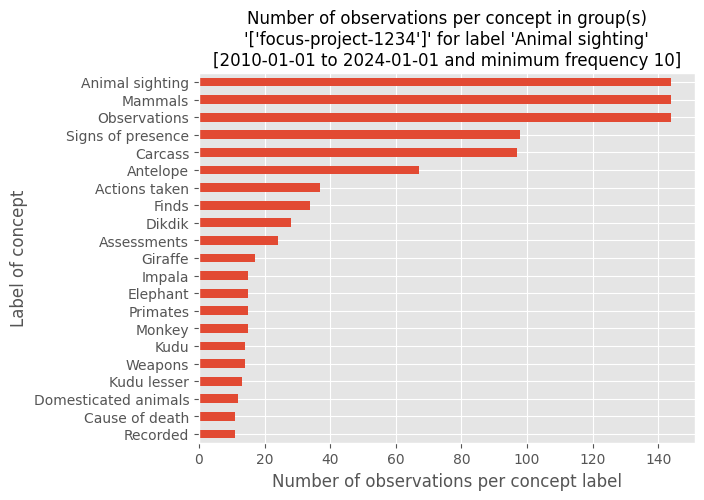
Count concepts related to observations
Get the number of observations per concept in the ontology (hierarchy).
You can filter on for instance: - date_from and date_until. - A list of child concepts, e.g. by extracting children for the label “Animal sighting” from hierarchy (see example below).
[25]:
date_from = "2010-01-01"
date_until = "2024-01-01"
label = "Animal sighting"
children_label = helpers.get_children_for_label(hierarchy, label)
concept_counts = sensing_clues.get_concept_counts(
    groups, date_from=date_from, date_until=date_until, concepts=children_label
)
concept_counts.head()
[25]:
| frequency | _value | |
|---|---|---|
| 0 | 98 | https://sensingclues.poolparty.biz/SCCSSOntolo... |
| 1 | 97 | https://sensingclues.poolparty.biz/SCCSSOntolo... |
| 2 | 1 | https://sensingclues.poolparty.biz/SCCSSOntolo... |
| 3 | 1 | https://sensingclues.poolparty.biz/SCCSSOntolo... |
| 4 | 12 | https://sensingclues.poolparty.biz/SCCSSOntolo... |
To make the visualization intelligible, you can add information on labels from the hierarchy-dataframe.
To do so, first install matplotlib.
[26]:
# !pip install matplotlib
[27]:
import matplotlib.pyplot as plt
plt.style.use("ggplot")
[28]:
min_freq = 10
if not concept_counts.empty:
    concept_freq = concept_counts.merge(
        hierarchy, left_on="_value", right_on="id", how="left"
    )
    concept_freq["label"] = concept_freq["label"].fillna(concept_freq["_value"])
    concept_freq = concept_freq.set_index("label")["frequency"].sort_values(
        ascending=True
    )

    concept_freq.loc[concept_freq >= min_freq].plot(kind="barh")
    plt.title(
        f"Number of observations per concept in group(s)\n'{groups}' for label '{label}'\n"
        f"[{date_from} to {date_until} and minimum frequency {min_freq}]",
        fontsize=12,
    )
    plt.xlabel("Number of observations per concept label")
    plt.ylabel("Label of concept")
Get layers
[29]:
# check all available layers
layers = sensing_clues.get_all_layers()
layers
[29]:
| pid | lid | layerName | description | geometryType | |
|---|---|---|---|---|---|
| 0 | 1234 | 0 | test_multipolygon | All MultiPolygon geometries for layer test_mul... | MultiPolygon |
| 1 | 1234 | 1 | test_polygon | All Polygon geometries for layer test_polygon | Polygon |
Get details for an individual layer
[30]:
layer = sensing_clues.get_layer_features(layer_name="test_multipolygon")
[31]:
layer.head()
[31]:
| id | DocId | ShortId | OBJECTID | EntityId | NAME | geometry | _type | _id | geometry_type | geometry_coordinates | properties_DocId | properties_ShortId | properties_OBJECTID | properties_EntityId | properties_NAME | |
|---|---|---|---|---|---|---|---|---|---|---|---|---|---|---|---|---|
| 0 | 194355991 | /GeoFeature/G1234-9853708381955736304-1.json | 194355991 | 194355991 | G1234-9853708381955736304-1 | None | MULTIPOLYGON (((4.87038 52.25303, 4.80171 52.2... | Feature | 194355991 | MultiPolygon | [[[[4.87037658691406, 52.2530274427686], [4.80... | /GeoFeature/G1234-9853708381955736304-1.json | 194355991 | 194355991 | G1234-9853708381955736304-1 | None |
| 1 | 151201554 | /GeoFeature/G1234-9853708381955736304-2.json | 151201554 | 151201554 | G1234-9853708381955736304-2 | None | MULTIPOLYGON (((5.06779 52.05713, 5.06710 52.0... | Feature | 151201554 | MultiPolygon | [[[[5.06778717041016, 52.0571349329375], [5.06... | /GeoFeature/G1234-9853708381955736304-2.json | 151201554 | 151201554 | G1234-9853708381955736304-2 | None |
| 2 | 108047117 | /GeoFeature/G1234-9853708381955736304-3.json | 108047117 | 108047117 | G1234-9853708381955736304-3 | None | MULTIPOLYGON (((5.87116 51.85381, 5.88181 51.8... | Feature | 108047117 | MultiPolygon | [[[[5.87116241455078, 51.8538062484514], [5.88... | /GeoFeature/G1234-9853708381955736304-3.json | 108047117 | 108047117 | G1234-9853708381955736304-3 | None |
This requires installation of library to visualize geospatial data. Here, we use Folium.
[32]:
# !pip install folium
[33]:
import folium
[34]:
poly_map = folium.Map([51.9244, 4.4777], zoom_start=8, tiles="cartodbpositron")
for _, geometry in layer["geometry"].items():
    folium.GeoJson(geometry).add_to(poly_map)
folium.LatLngPopup().add_to(poly_map)
poly_map
[34]:
[ ]: